Parallels Desktop for Chromebook Enterprise (Electronic Download)
sku: 4L41K04440
ACCORDING TO OUR RECORDS THIS PRODUCT IS NOT AVAILABLE NOW
$69.99
Shipping from: United Kingdom
Description
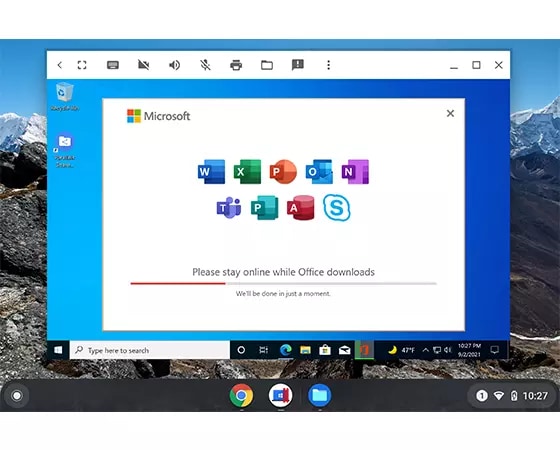
Run full-featured Windows applications including Microsoft Office directly on Lenovo ChromeOS Enterprise devices—even offline! Parallels® Desktop for ChromeOS brings Windows productivity to ChromeOS devices with simple and secure IT orchestration via the app licensing feature in Google Admin console. End users enjoy effortless access to the Windows Virtual Machine with a simple click on the Parallels icon.Tech SpecsConsider adding on Parallels Desktop for ChromeOS IT managed licenses with compatible Lenovo ChromeOS Enterprise devices to run full-featured Windows desktop appsChromeOS version - 85 or laterProcessor - Intel Core i3 11th Gen and newer, i5 or i7, AMD Ryzen 3 5000 series and newer, 5 or 7Memory - 8GB of RAMStorage - 128GB or moreAdditional Requirements - Google Admin console, Chrome Enterprise Upgrade or Chrome Education Upgrade, Microsoft Windows, Corporate storage serverKey DetailsChromeOS + Windows, together at last – Harness the productivity of ChromeOS and Windows. Seamlessly switch between environments or run both side-by-side and enjoy offline accessSimple IT management – Easily administer, license and manage this Windows Virtual Machine solution that is integrated into ChromeOS, addressing specific needs across your organization with the app licensing feature in the Google Admin consoleSecure by design – Minimize security threats with the inherently secure, integrated ChromeOS, while running your essential Windows apps safely within ChromeOS sandboxesSingle-click Windows access – Effortlessly access the Windows Virtual Machine with a simple click on the Parallels icon. Utilize Windows desktop applications and enjoy access to the desktop, documents, downloads and custom folders from ChromeOSCross-platform productivity – Simply move content between ChromeOS and Windows via a shared clipboard or drag and drop. It’s easy for users to live in both worlds and collaborate across operating systems with consistent file formatting and fontsTake meetings on Microsoft Teams or Zoom via their native apps on Parallels DesktopOffline accessible – Efficiently work anytime, from anywhere, within your familiar Windows desktop applications offline, utilizing the full feature sets of applications and accessing Windows desktop, documents and downloadsCustomize your Windows VM image – Prepare your fleet with the most applicable Windows Virtual Machine image for their internal organization unit, and easily deploy at scale across all ChromeOS devices within each groupPeripheral friendly – Adjust your Windows Virtual Machine and ChromeOS windows across two displays. Connect your mouse, keyboard, dock, webcam, and other accessories
Price history chart & currency exchange rate
Customers also viewed


$40.89
designers mens dress shirts business fashion casual classic long sleeve shirt brands men spring slim fit chemises de marque clothi6349435, White;black
dhgate.com

$4.78
Кожаный ремешок для Apple Watch Band Ultra 8 7 6 5 4 3 2 45 мм 41 мм, повседневный браслет для часов, петля 44 мм 42 мм 40 мм 38 мм
aliexpress.ru
$8.02
100% Cotton T Shirts Brand Clothing Tops Tees New Oasis What'S The Story Morning Glory Men'S T Shirt
aliexpress.com


$29.08
Женское свободное платье Creatingtime, плиссированное лоскутное платье контрастных цветов с круглым вырезом и рукавом до локтя, модель LH186 на лет...
aliexpress.ru
$5.83
Бесплатная доставка! 1440 шт./лот, ss6 (1,9-2,1 мм) Оливковый AB плоский задний дизайн ногтей Клей На Стразы без горячей фиксации
aliexpress.ru
$25.48
Кухонные принадлежности, пять типов лезвий из нержавеющей стали 304 терка для лимонов, терка для овощей для кухни, гаджеты и аксессуары
aliexpress.ru