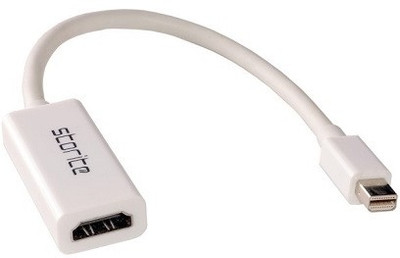
Storite Mini DisplayPort to HDMI Cable For Apple Macbook HDMI Cable(Compatible with Mobile, Laptop, Tablet, Mp3, Gaming Device, White)
Storite
sku: ACCE472CUTDUUEVY
ACCORDING TO OUR RECORDS THIS PRODUCT IS NOT AVAILABLE NOW
$14.34
Shipping from: India
Description
The Mini DisplayPort is only found on newer models of Macs. You should check what port type you have before purchase. Mini DisplayPorts dating before April 2010 do not support audio out and will not transmit sound. Viewing your MacBook on your HDTV doesn't get any easier. Simply, plug the Mini DisplayPort end into your Mac��, and connect the HDMI end to an HDMI (Type-A) cable, then plug the cable into your HDMI input jack. Your photos, your videos, your presentations, your games - view them all in HD on the big screen. The Mini DisplayPort adapter will need to be used with an HDMI cable (sold separately). Please Note: The Mini DisplayPort is only found on newer models of Macs. You should check what port type you have before purchase. Mini DisplayPorts dating before April 2010 do not support audio out and will not transmit sound. Ideal For: HD Video/Photo Playback Streaming Media Viewing Documents Sharing Content with Friends/Family. Product Description Simply, plug the Mini Display Port end into your Mac, and connect the HDMI end to an HDMI (Type-A) cable, then plug the cable into your HDMI input jack. Please Note: The Mini Display Port is only found on newer models of Macs. You should check what port type you have before purchase. Mini Display Ports dating before April 2010 do not support audio out and will not transmit sound.
Technical Details
| Color: | White |
Price history chart & currency exchange rate